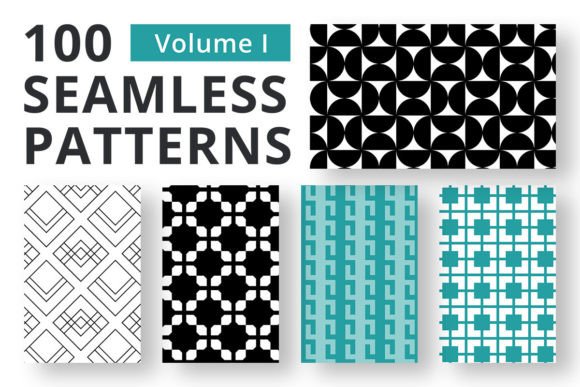
Seamless Patterns for Photoshop Vol 1
Creating a design that stands out often comes down to the subtle details that most people overlook. While typography and color palettes grab immediate attention, it is the texture and depth provided by high-quality patterns that give a project its professional polish. Whether you are crafting a digital invitation, designing a brand identity, or simply enhancing a personal scrapbook page, the difference between a flat image and a compelling visual lies in how you layer elements. Seamless Patterns for Photoshop Vol 1 addresses this need directly by offering a curated collection of textures that integrate effortlessly into your workflow.
This toolkit is not merely a bag of decorative assets; it is a functional resource designed to solve common problems designers face when trying to add realism to their work. The collection features 100 distinct seamless patterns delivered in a convenient .PAT file format. These files can be imported directly into Adobe Photoshop, allowing you to apply complex textures with a single click. Beyond the standard pattern fills, the package includes 100 corresponding PNG overlays. Each overlay is sized at 3600x3600 pixels with a transparent background, ensuring they remain sharp even when scaled up for large-format printing or high-resolution web displays. This dual-format approach provides the flexibility needed for both quick adjustments and precise, detailed manipulation.
Streamlining the Design Workflow
For professionals and freelancers alike, time is often the most valuable currency. Traditional methods of creating custom textures involve scanning physical materials, photographing surfaces, or painstakingly drawing patterns from scratch. While these methods yield unique results, they require significant technical skill and hours of labor. Seamless Patterns for Photoshop Vol 1 eliminates the initial setup phase, allowing creators to focus on composition and concept rather than asset generation.
The inclusion of the .PAT file means you do not need to navigate complex filters or external plugins to achieve a textured look. Once loaded, these patterns appear in your standard Pattern Picker, ready to be applied via the Layer Style dialog or the Paint Bucket tool. This immediacy is particularly beneficial during brainstorming sessions or client presentations where rapid prototyping is essential. You can test multiple textural directions in minutes, helping you make faster decisions about the overall aesthetic without getting bogged down in technical execution.
Enhancing Visual Depth and Realism
One of the primary challenges in digital design is replicating the tactile feel of the physical world on a two-dimensional screen. A flat background can sometimes make a layout feel sterile or unfinished. By integrating the textures from this collection, designers can introduce micro-details that catch the eye and add dimensionality. The 100 pattern overlays included in the set are particularly powerful here. Because they are separate PNG files with transparency, you can blend them using various blending modes like Multiply, Overlay, or Soft Light.
This capability allows for nuanced control over how light and shadow interact within your design. For instance, applying a subtle paper grain overlay to a logo design can make it feel more organic and less digital. In web design, a faint texture behind a call-to-action button can increase perceived value and encourage user interaction. The 3600x3600 pixel resolution ensures that these effects remain crisp, preventing the pixelation that often ruins the illusion of quality in lower-resolution assets. This level of precision supports projects ranging from small social media graphics to large-scale packaging designs.
Versatility Across Creative Industries
The utility of Seamless Patterns for Photoshop Vol 1 extends far beyond graphic design studios. The versatility of these assets makes them relevant to a wide array of creative roles and hobbies. Marketers looking to refresh their social media content can use these patterns to create cohesive campaign visuals that stand out in crowded feeds. Bloggers and educators can enhance their instructional materials or e-books with backgrounds that guide the reader's eye without being distracting.
- Digital Scrapbooking: Hobbyists can combine these patterns with photos and journaling cards to create layouts that mimic the look of traditional paper crafts but with the ease of digital editing.
- Branding and Identity: Small business owners can establish a unique brand voice by applying specific textures to logos, business cards, and letterheads, adding a layer of sophistication that distinguishes them from competitors.
- Packaging Design: For entrepreneurs launching physical products, these patterns provide a realistic preview of how materials might look on boxes, labels, and tags before committing to expensive print runs.
- Event Invitations: Wedding planners and party hosts can craft elegant invitations with intricate backgrounds that convey the tone of the event immediately.
Each use case benefits from the consistent quality of the collection. Unlike random free downloads that may vary wildly in style or resolution, this set offers a cohesive library of options that can be mixed and matched to fit specific project requirements.
Bridging the Gap Between Skill Levels
It is easy to assume that advanced texture techniques are reserved for experienced artists, but tools like this democratize access to high-end design aesthetics. Beginners who may struggle with manual texture creation can achieve professional-looking results by leveraging these pre-made assets. The intuitive nature of the .PAT import process lowers the barrier to entry, while the precision of the PNG overlays offers room for growth as skills develop.
Seasoned designers also find value in this collection as a starting point for their own custom modifications. Instead of building every texture from zero, a professional can apply one of these base patterns and then adjust hue, saturation, or opacity to create a unique variation tailored to a specific client's needs. This approach maintains efficiency without sacrificing creativity, ensuring that the final output remains original despite using a shared foundation.
Making Informed Choices for Your Projects
While the benefits of using a comprehensive pattern library are clear, it is important to consider how these assets fit into your specific workflow. Not every project requires a heavy texture; sometimes, minimalism is the best approach. The key is knowing when to apply these layers to enhance rather than overwhelm the design. Users should experiment with the opacity settings of the PNG overlays to find the right balance between texture and clarity.
Additionally, while the 3600x3600 pixel size is robust for most modern applications, extremely large format prints (such as billboards) might require higher resolution sources depending on the viewing distance. However, for the vast majority of digital and standard print applications, this resolution is more than sufficient. It is always wise to compare the style of the patterns against your existing brand guidelines or project themes to ensure they align with your intended message. The goal is to support your artistic vision, not dictate it.
In conclusion, Seamless Patterns for Photoshop Vol 1 serves as a practical investment for anyone looking to elevate their visual communication. By providing a reliable source of high-quality textures and overlays, it empowers users to produce work that feels richer, deeper, and more polished. Whether you are refining a portfolio, launching a new product, or exploring a new creative hobby, having these tools readily available simplifies the design process and expands the possibilities for what you can create.